
The Advanced Settings page gives you control over how frequently CP Live checks for streams, how long to show a stream as live, and which streaming services are enabled.
Accessing Advanced Settings
- Log in to your WordPress admin dashboard
- Navigate to Settings → CP Live
- Click the Advanced tab
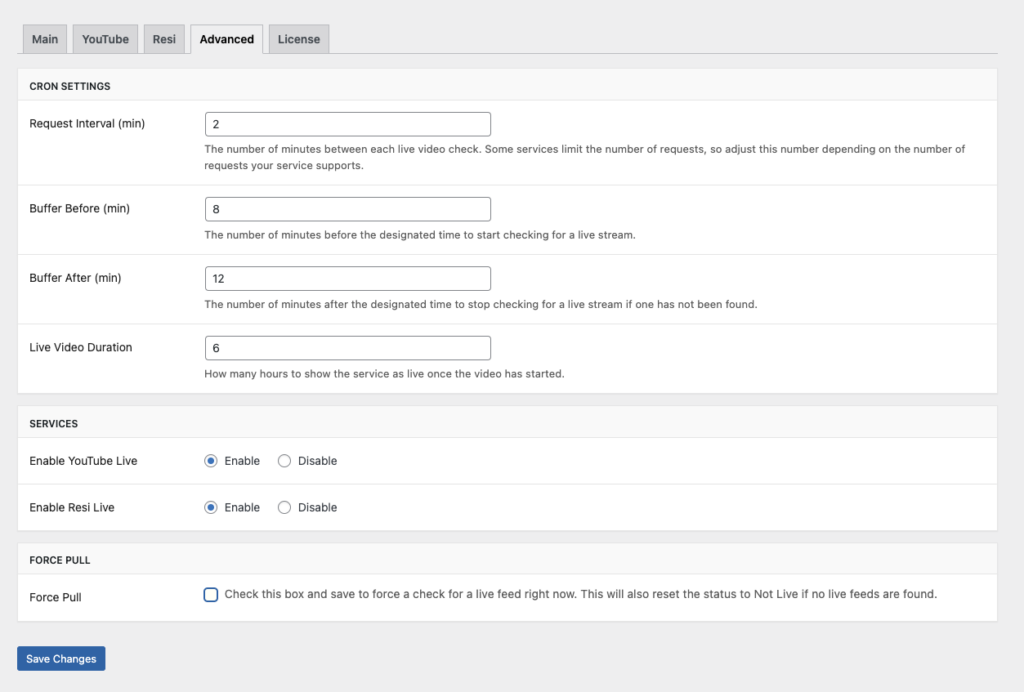
Cron Settings
These settings control how CP Live checks for live streams.
| Setting | Default | Description |
|---|---|---|
| Request Interval (min) | 2 | How often (in minutes) CP Live checks for a live stream. Lower values detect streams faster but use more API quota |
| Buffer Before (min) | 8 | How many minutes before the scheduled time to start checking for a live stream |
| Buffer After (min) | 12 | How many minutes after the scheduled time to keep checking if no stream has been found |
| Live Video Duration | 6 | How many hours to continue showing the stream as live after it is first detected |
Understanding Buffers
Buffers create a window around your scheduled service time during which CP Live actively checks for streams. For example, with a 9:00 AM schedule, an 8-minute buffer before, and a 12-minute buffer after:
- Checking starts at 8:52 AM (8 minutes before)
- If no stream is found by 9:12 AM (12 minutes after), checking stops until the next scheduled time
Adjust these values based on how early or late your streams typically start.
Services
Enable or disable each streaming service. Only enabled services appear as configuration tabs and are checked during scheduled times.
- Enable YouTube Live: Enabled by default. Turn off if you do not use YouTube for streaming.
- Enable Resi Live: Disabled by default. Enable if you use Resi as your streaming provider.
Force Pull
Use Force Pull to manually trigger a live stream check outside of your regular schedule:
- Check the Force Pull checkbox
- Click Save Changes
- CP Live immediately checks all active services for a live stream
- If no live stream is found, the status resets to Not Live
This is useful for testing your configuration or troubleshooting detection issues.
Troubleshooting
If your advanced settings are not behaving as expected:
- Ensure your request interval is not set too high, which could cause missed streams
- Verify that WordPress cron is running properly on your server
- Check the Troubleshooting guide for more help